


Key Attestation Demo
4.813.00 Reviews
App Specs
- Version
- 1.5.0
- Updated On
- License
- Free
- Downloads
- 100,000+
- Developer
- Xingchen & Rikka
- Categories
- Libraries & Demo
- Platform
- Android
Screenshots
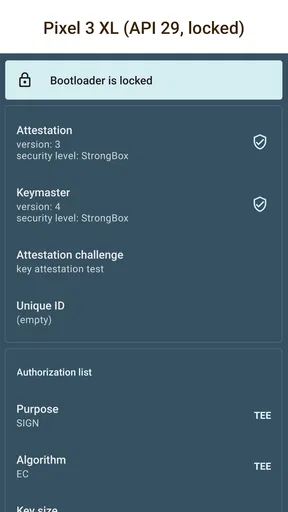
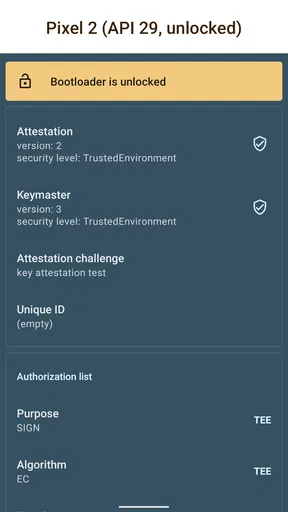
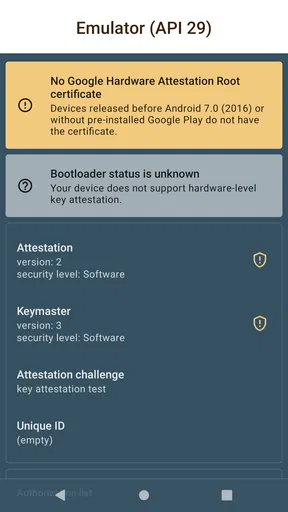
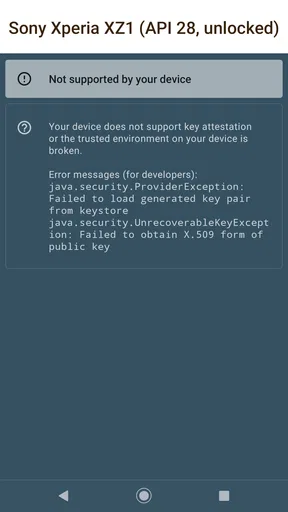
 Analysis by AppCompare
On your first day with Key Attestation Demo, the appeal is easy to understand: it turns an Android security concept into something you can inspect rather than merely hear about. I like that hands-on angle, especially if you have wondered what a device can demonstrate about the protection of its cryptographic keys. This is a focused utility, not a general security scanner, so the best experience comes when curiosity or development work gives you a reason to explore it.
A useful first look, not a security score
When I try a technical demo like this, I treat the first session as a guided inspection, not a verdict on whether my phone is “secure.” Key attestation can show evidence about a key and its device environment, but interpreting that evidence takes context. A certificate chain, for example, is more useful when you know what the certificates represent than when you simply see a long block of technical text. The app’s value is that it makes this system-level topic more tangible; it should not be mistaken for a full audit of every part of Android.
That distinction is useful for newcomers. If you are exploring Android security for the first time, take a moment to look at the information rather than assuming that a successful-looking result guarantees that every app or account on the phone is protected. Attestation addresses a particular question about cryptographic keys. It does not replace sensible account security, software updates, or careful app choices.
Who gets lasting value from it?
The strongest fit is someone who will return with a specific question: a developer checking how key attestation behaves on a device, a student trying to connect security theory with a real Android system, or a technically curious owner who wants to understand what the feature is for. Xingchen & Rikka’s app sits in the Libraries & Demo space, and that framing matters. It is more like a compact learning and testing aid than an everyday protection app.
For a developer, a practical workflow is to use the demo as a first point of inspection, note what the device reports, then compare that with the requirements of the app being built. It can help turn an abstract implementation question into something concrete. I would still use the relevant development tools and documentation for deeper debugging; a demo is a useful companion, not a substitute for a complete test setup.
Where it fits beside familiar alternatives
Most people looking for phone security reach for antivirus tools, privacy dashboards, or device-checking apps. Those serve different purposes: they aim to help with threats, permissions, or broad device status. Key Attestation Demo is narrower. It focuses attention on attestation rather than trying to give a general security grade, which is an advantage when you want to learn about this one mechanism and a limitation when you want an all-purpose safety check.
Compared with reading about attestation alone, inspecting a live device can make the subject easier to grasp. Compared with a full developer test environment, the app is likely to feel more approachable but less comprehensive. I find that middle ground worthwhile for learning and quick checks, as long as I do not ask it to answer questions outside its scope.
Worth Reading Before You Choose

EA SPORTS FC Mobile 26 Is a Bigger Football Game, but It Takes Time

Flipboard Shows What News Apps Must Do Beyond the Feed

Switching to Android Auto Means Rethinking Your Driving Routine

Google Calendar Makes a Crowded Week Easier to Manage

Ludo King Makes the Most of the Minutes Between Plans

Baby Panda World Brings Quick Play to Modern Phones, but Its Game Library Feels Busy
A realistic reason to open it again
Imagine you are building or evaluating an Android feature that relies on protected keys. You can open the demo while working through the design, inspect the attestation output, and use that as a prompt for questions to investigate in your main testing workflow. That is a more meaningful recurring use than opening it at random to see whether the phone has changed. For a student, the same habit could mean revisiting it alongside a lesson or project, then explaining in plain language what the certificate information does and does not establish.
A practical tip is to keep a short note of what you were trying to learn and what the output meant to you at the time. That makes a later comparison more useful than relying on memory, particularly if you are testing different devices or working through a development task. Avoid treating two screens as directly comparable unless you understand the context and what changed; the point is to investigate, not to collect impressive-looking results.
Questions worth settling before installing
Will it help if I am not a security expert? It can, if you are comfortable approaching technical material patiently and want a demonstration rather than a simple pass-or-fail message. If you need plain-language protection advice, a familiar security guide or a tool aimed at everyday device hygiene will probably suit you better. Is it useful to developers? Yes, as a convenient way to explore the attestation concept on Android, though serious implementation work calls for broader testing as well.
Does it replace antivirus or a privacy tool? No; those tools address different concerns, and this demo is not a general-purpose shield. Should you keep it installed permanently? That depends on whether you revisit the subject. A student or developer may value having it available during a course or project, while a casual user may learn what they came for and then have little reason to open it again.
There is also a device-specific caveat to keep in mind: Android hardware and software environments can differ, so a result that makes sense on one phone should not automatically be treated as universal. If you are using the app to support a development decision, verify the behavior across the devices relevant to your users rather than drawing broad conclusions from a single handset.
What a month of ownership looks like
After the novelty fades, this is not the kind of app I would expect to check every morning. Its recurring value comes from having a focused place to inspect key attestation when a project, class, or particular question calls for it. That makes it more like a reference instrument than a daily habit. I would keep it installed during active learning or development, then reassess once that work is finished instead of keeping every specialist tool indefinitely.
The maintenance burden seems modest in concept: open it when there is a reason, interpret the output carefully, and keep the broader device context in mind. The friction is mainly intellectual rather than routine. Technical details can be confusing if you do not know what you are looking at, and a demo cannot make the underlying concepts disappear. If you want a single reassuring message, this is not the right style of app.
That focused role is also why the app may age differently for different people. A developer might return to it when checking a new implementation or learning how Android handles attestation. Someone who only wanted a one-time explanation may find that the lesson sticks but the app itself no longer earns space. Neither outcome means the tool failed; it simply reflects whether your needs recur.
Understanding Key Attestation
So, what exactly is key attestation? In simple terms, it’s a feature that provides proof that a cryptographic key is stored in a secure enclave in your device’s hardware. This ensures that your keys are not only secure but also verifies the integrity of the device. With Key Attestation Demo, you can actually see how this process works on your phone.
Getting Started with the App
Downloading and installing the app is a breeze. Once you fire it up, you’re greeted with a clean and user-friendly interface. No frills, just straight to the point. It’s like having a backstage pass to your device’s security features. The app walks you through the key attestation process, showing you what’s happening under the hood. For folks who love diving into tech, it’s a real treat.
The Features That Stand Out
One of the features I found really impressive is the app’s ability to generate a certificate chain. This is essentially a series of certificates that help verify the authenticity of your device’s keys. The app breaks down complex info into bite-sized pieces, making it digestible even for those who might not have a deep understanding of cryptography.
The app also lets you view the attestation certificate in a human-readable format. This transparency is refreshing and allows users to see firsthand what the app is doing with their data. It’s all about building trust, and I think Key Attestation Demo nails it.
Real-World Application
Now, you might be thinking, “This sounds cool, but why should I care?” Well, let me tell you, key attestation is crucial for any app that handles sensitive data. Financial apps, for instance, use similar technology to ensure that transactions are secure. Understanding how this works can give you peace of mind when you’re using apps that require a high level of security.
Moreover, developers can use Key Attestation Demo to test their apps’ security measures. It’s like having a test bench right in your pocket. You can ensure that your app’s cryptographic keys are protected, making your app more trustworthy in the eyes of users.
Final Thoughts
All in all, Key Attestation Demo is not just an app; it’s a learning tool. It opens up a world of understanding about your device’s security features. Whether you’re a tech geek or just someone curious about how secure your device is, this app is worth exploring.
To wrap it up, Key Attestation Demo is a fantastic resource for anyone interested in the security domain. It’s practical, informative, and, most importantly, transparent. And hey, it’s always nice to know what’s going on under the hood of your device, right?
Keeping expectations in proportion
As a free app rated for Everyone, with a 4.8 average from around 313 ratings and over 100K installs, it has clearly found an audience among people interested in Android’s technical side. Its current version is 1.5.0, and it runs on Android 7.0 or later. Those details make it accessible to many Android users, but they do not change its specialist purpose: this is a demonstration of one security capability, not a replacement for routine device care.
The main source of fatigue is likely to be the gap between what the app shows and what a casual user hopes to learn. A certificate may look authoritative, yet understanding its implications requires some knowledge of the process and the device. I would not install it expecting a simple answer to “Is my phone safe?” For that, broader security habits and tools are more relevant.
My long-term verdict is that it earns space while you have a concrete reason to study or test key attestation. Xingchen & Rikka have made a narrow Android feature easier to inspect, and that is genuinely useful for the right reader. Once your class or project is over, it is perfectly reasonable to remove it and return if another question comes up. Its strength is not daily engagement; it is being a practical, focused window into a system feature when you need one.
Pros
- Easy to navigate interface.
- Provides secure key management.
- Supports multiple encryption algorithms.
- Detailed documentation available.
- Compatible with most Android versions.
Cons
- Limited to Android devices.
- Requires API level 28 or higher.
- No iOS support available.
- Lacks user-friendly tutorials.
- Minimal customer support options.
FAQs for Key Attestation Demo
What is Key Attestation Demo used for?
Key Attestation Demo is designed to showcase how devices can securely attest to the creation and use of cryptographic keys. It helps developers understand how to implement security features that verify the integrity and authenticity of these keys on Android devices.
How does Key Attestation Demo enhance device security?
The app enhances device security by allowing users to verify that cryptographic keys are securely generated and stored in the device’s hardware-backed keystore. This minimizes the risk of key extraction by malicious apps, ensuring higher security for sensitive operations.
Is Key Attestation Demo suitable for all Android devices?
Key Attestation Demo is designed for Android devices that support hardware-backed key attestation. While newer devices typically support this feature, it's important to check your device’s specifications to ensure compatibility before using the app.
Can non-developers benefit from using Key Attestation Demo?
While primarily designed for developers, non-developers interested in understanding Android security features may find value in the app. However, it’s more technical in nature, and users without a programming background might find some aspects challenging.
Does using Key Attestation Demo require an internet connection?
The app itself can function offline for local key generation and attestation tasks. However, an internet connection might be necessary if you wish to validate keys with remote servers or access additional resources and updates from the developer's site.


